
SQL Join Operations using Python


Join Operation

We can combine the columns from two or more tables by using some common column among them by using the join statement.


Example

  1. import mysql.connector  
  2.   
  3. #Create the connection object   
  4. mydb = mysql.connector.connect(host = "localhost", user = "root",password = "12345sibi")  
  5.   

  6.   

IDLE :


To create a cursor object  and display existing database we need to follow the below code:


To display the elements inside the employee table we need to execute the following code:


To Display the tables:


SQL INNER JOIN Keyword

The INNER JOIN keyword selects records that have matching values in both tables.

INNER JOIN Syntax

SELECT column_name(s)
FROM table1
INNER JOIN table2
ON table1.column_name = table2.column_name;


SQL Self Join

A self join is a regular join, but the table is joined with itself.

Self Join Syntax

SELECT column_name(s)
FROM table1 T1, table1 T2
WHERE condition;

Right Join

The RIGHT JOIN keyword returns all records from the right table (table2), and the matching records from the left table (table1). The result is 0 records from the left side, if there is no match.

RIGHT JOIN Syntax

SELECT column_name(s)
FROM table1
RIGHT JOIN table2
ON table1.column_name = table2.column_name;

Note: In some databases RIGHT JOIN is called RIGHT OUTER JOIN.
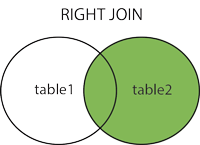
SQL RIGHT JOIN


Example


 As you can see in the above, It returns everything from sales table.since there is no match for the sales column elements, It returns None.

Left Join

The left join covers all the data from the left-hand side table. It has just opposite effect to the right join. 

LEFT JOIN Syntax

SELECT column_name(s)
FROM table1
LEFT JOIN table2
ON table1.column_name = table2.column_name;

Note: In some databases LEFT JOIN is called LEFT OUTER JOIN.
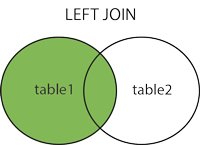
SQL LEFT JOIN

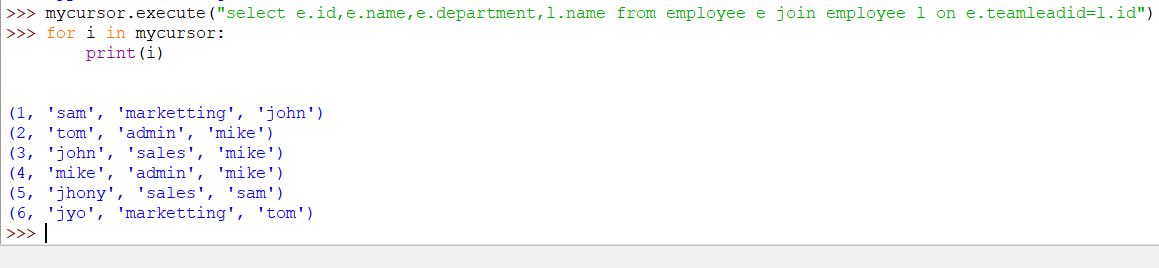
Consider the following example.

Example


SQL Self Join

A self join is a regular join, but the table is joined with itself.

Self Join Syntax

SELECT column_name(s)
FROM table1 T1, table1 T2
WHERE condition;


Comments

Popular posts from this blog

JENKINS BASICS

  Jenkins  – an open source automation server which enables developers around the world to reliably build, test, and deploy their software. Dashboard: " Dashboard " is the default view shown when you open Jenkins and shows an overview of all  projects configured on a  Jenkins  instance. Creating a New Project: Step 2:  In the next screen, enter the Item name, Choose the ‘Freestyle project option’ Step 3  − The following screen will come up in which you can specify the details of the job. Note  − If you repository if hosted on Github, you can also enter the url of that repository here. In addition to this, you would need to click on the Add button for the credentials to add a user name and password to the github repository so that the code can be picked up from the remote repository. Step 4 − Now go to the Build section and click on Add build step → Execute Windows batch command Before Executing and building a file. Let me describe the task which w...

Architechture of Kubernetes

  Kubernetes Architecture and Components: It follows the client-server architecture, from a high level, a Kubernetes environment consists of a  control plane (master) , a  distributed storage system  for keeping the cluster state consistent ( etcd ), and a number of  cluster nodes (Kubelets). We will now explore the individual components of a standard Kubernetes cluster to understand the process in greater detail. What is Master Node in Kubernetes Architecture? The Kubernetes Master (Master Node) receives input from a CLI (Command-Line Interface) or UI (User Interface) via an API. These are the commands you provide to Kubernetes. You define pods, replica sets, and services that you want Kubernetes to maintain. For example, which container image to use, which ports to expose, and how many pod replicas to run. You also provide the parameters of the desired state for the application(s) running in that cluster. API Server: The  API Server  is the front-end...

NumPY In python

 NumPy Stands for numerical python How do I install NumPy? To install Python NumPy, go to your command prompt and type “pip install numpy”.  Once the installation is completed, go to your IDE (For example: PyCharm) and simply import it by typing:  “import numpy as np” Here, I have different elements that are stored in their respective memory locations. It is said to be two dimensional because it has rows as well as columns. In the above image, we have 3 columns and 4 rows available. How do I start NumPy? Single-dimensional Numpy Array: 1 2 3 import numpy as np a = np.array([ 1 , 2 , 3 ]) print (a) Output – [1 2 3] Multi-dimensional Array: 1 2 a = np.array([( 1 , 2 , 3 ),( 4 , 5 , 6 )]) print (a) O/P – [[ 1 2 3] [4 5 6]] Python NumPy Array v/s List Why NumPy is used in Python? We use python NumPy array instead of a list because of the below three reasons: Less Memory Fast Convenient The very first reason to choose python NumPy array is that it occupies less memory as co...