
INTEGRATION OF JENKINS AND GITHUB REPOSITORY

One of the basic steps of implementing CI/CD is integrating your SCM (Source Control Management) tool with your CI tool. This saves you time and keeps your project updated all the time. One of the most popular and valuable SCM tools is GitHub. In this blog I will explain how to integrate Jenkins with GitHub projects. 


Step 1: Create a Repository in Git Hub . In my case I have created a repository named jenkinsdemo.


Step 2:  Create a python file (.py) file in your Repository. In my case I have created check.py.


Step 3:  Contents in check.py.


print("Entered Check") import time
print("new python file")
time.sleep(5)
print("hello world")
time.sleep(5)
print("hi everyone")


Step 4: Save that python file and go to jenkins.

Configuring Jenkins


Step 5: In Jenkins, click on ‘New Item’ to create a new project.
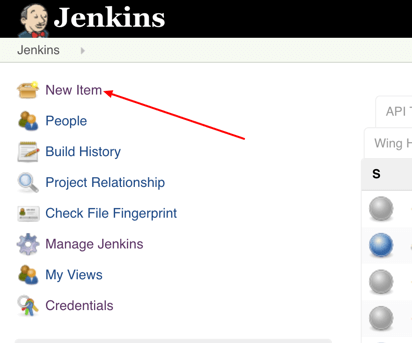
 

jenkins configuration for github


Step 6: Give your project a name, then choose ‘Freestyle project’ and finally, click on ‘OK’.
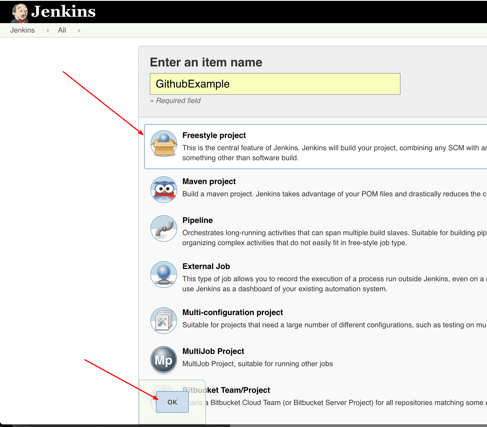
 

jenkins ci, github scm


Step 7: Click on the ‘Source Code Management’ tab.
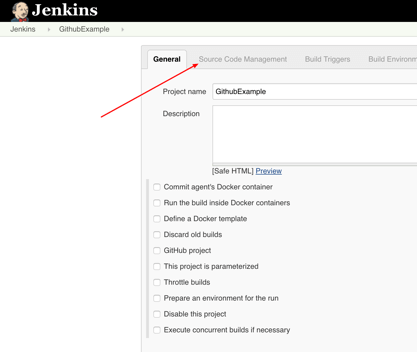
 

adding your scm to continuous integration


Step 8: Click on Git and paste your GitHub repository URL in the ‘Repository URL’ field.
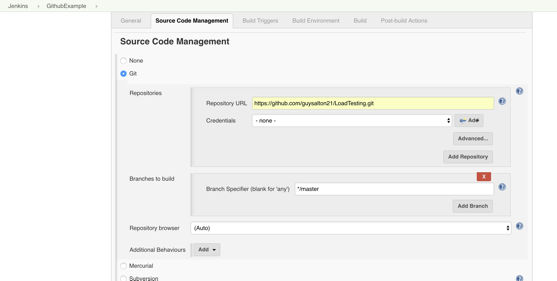
 

GitHub and Jenkins combination


Step 9: ADD Credentials. Give your git hub username and password. Give a ID(your wish).


Step 10: After Adding the credentials, In the credentials column , the entered details will show up.


Step 11:  Mention the branch in git.....(main in my case) as shown in above pic


Step 12: Execute using a windows batch.


Step 13: After building Save and Build now. The output...


Comments

Popular posts from this blog

Exception Handling in Python

  Introduction   An error is an abnormal condition that results in unexpected behavior of a program. Common kinds of errors are syntax errors and logical errors. Syntax errors arise due to poor understanding of the language. Logical errors arise due to poor understanding of the problem and its solution.   Anomalies that occur at runtime are known as exceptions. Exceptions are of two types: synchronous exceptions and asynchronous exceptions. Synchronous exceptions are caused due to mistakes in the logic of the program and can be controlled. Asynchronous exceptions are caused due to hardware failure or operating system level failures and cannot be controlled.   Examples of synchronous exceptions are: divide by zero, array index out of bounds, etc.) . Examples of asynchronous exceptions are: out of memory error, memory overflow, memory underflow, disk failure, etc. Overview of errors and exceptions in Python is as follows:     Handling Exceptions   Flowch...

Architechture of Kubernetes

  Kubernetes Architecture and Components: It follows the client-server architecture, from a high level, a Kubernetes environment consists of a  control plane (master) , a  distributed storage system  for keeping the cluster state consistent ( etcd ), and a number of  cluster nodes (Kubelets). We will now explore the individual components of a standard Kubernetes cluster to understand the process in greater detail. What is Master Node in Kubernetes Architecture? The Kubernetes Master (Master Node) receives input from a CLI (Command-Line Interface) or UI (User Interface) via an API. These are the commands you provide to Kubernetes. You define pods, replica sets, and services that you want Kubernetes to maintain. For example, which container image to use, which ports to expose, and how many pod replicas to run. You also provide the parameters of the desired state for the application(s) running in that cluster. API Server: The  API Server  is the front-end...

JENKINS BASICS

  Jenkins  – an open source automation server which enables developers around the world to reliably build, test, and deploy their software. Dashboard: " Dashboard " is the default view shown when you open Jenkins and shows an overview of all  projects configured on a  Jenkins  instance. Creating a New Project: Step 2:  In the next screen, enter the Item name, Choose the ‘Freestyle project option’ Step 3  − The following screen will come up in which you can specify the details of the job. Note  − If you repository if hosted on Github, you can also enter the url of that repository here. In addition to this, you would need to click on the Add button for the credentials to add a user name and password to the github repository so that the code can be picked up from the remote repository. Step 4 − Now go to the Build section and click on Add build step → Execute Windows batch command Before Executing and building a file. Let me describe the task which w...